← Back to home·Back to “Office & Productivity”
LocModel
One-click local LLM deployment: it reads your hardware, recommends models that fit, and sets up the inference engine for you.
Visit tool →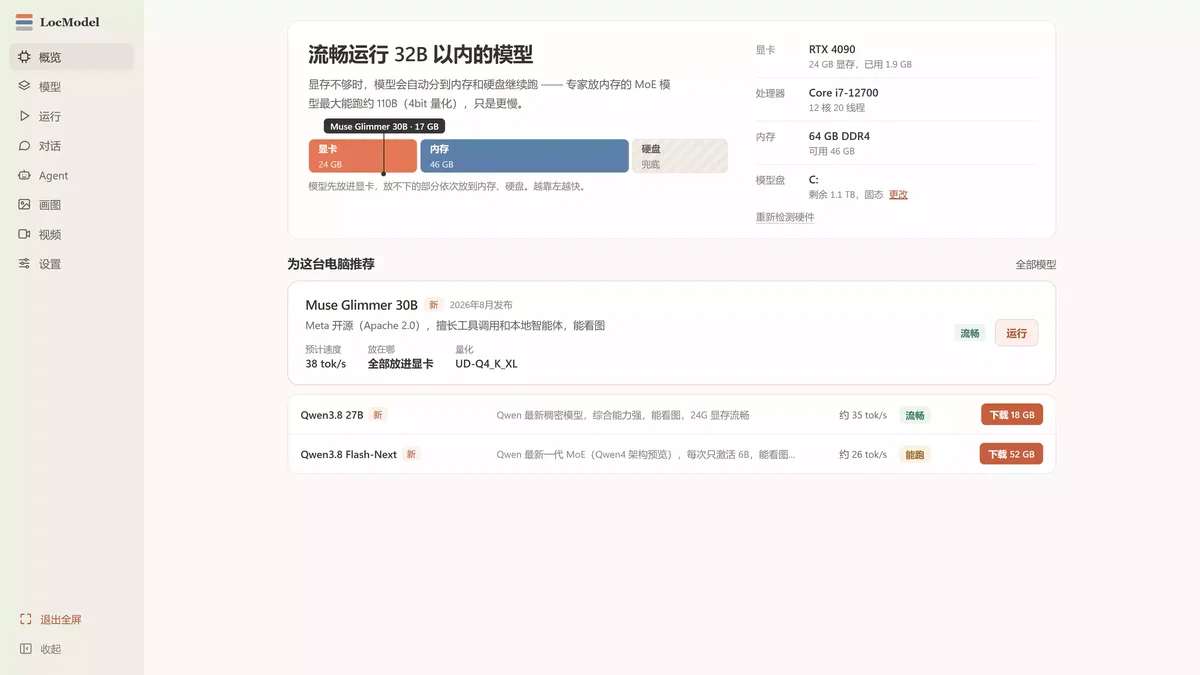
Details
LocModel is a local LLM deployment tool for Windows — currently v2.1.0 and listed as a free download on its official site. It starts with a hardware checkup: GPU model and VRAM, CPU cores, available RAM and disk space are read in one pass, then it recommends open-source models your machine can run smoothly, each labelled with estimated speed and fit. The inference engine needs no manual setup: it downloads the official llama.cpp build matching your hardware, covering NVIDIA, AMD, Intel and CPU-only backends, and when VRAM is not enough it automatically tiers some layers into RAM and disk. Models can be downloaded from HuggingFace filtered by hardware and use case, or imported as local GGUF files, then started with one click, with context length and thinking mode switchable. Recent versions add local image generation (the Z-Image family), video generation (Wan2.2) and a local Agent that reads and writes files and runs scripts inside a folder you choose, asking first before touching anything outside it. All inference runs on your own machine — no account needed, and prompts and outputs never leave the computer. Windows 10/11 x64 only; macOS and Linux are not supported.
Who it's for
Windows users who want to run open-source models such as Qwen or Gemma on their own PC without setting up environments, memorising parameters or compiling engines by hand — and anyone who would rather keep chats and files off the cloud.

18btc Crypto Tools Navigator · Our Take
“For people who hate setup: finding models, configuring the engine and juggling VRAM — the parts that scare everyone off — are all handled, free, no account, data stays on your machine. Not for macOS or Linux users (Windows 10/11 x64 only). One clarification: it runs open-source models, but we found no open-source claim for the software itself.”